
TestLens CLI 1.1.0: Search and Vim Keys
Last week we announced the TestLens CLI: run
testlens pr <number> and you get the failing
tests, their diffs, and their stack traces, right in your terminal.
Like most teams, we have that one person who insists on using Vim. They like
the CLI, but within days of 1.0.0 we got complaints about the TUI: no search,
and no navigation via hjkl. Consequently, right after release 1.0.0 we
decided that the next release would have both. So we’re happy to announce the
release of version
1.1.0, which ships
two new features.
Finding the failing test you care about
The first release listed every failing or flaky test in a table, which is fine
for pull requests with just a couple of failures. But as soon as the list grows
larger, finding that one specific test you’re looking for becomes tedious.
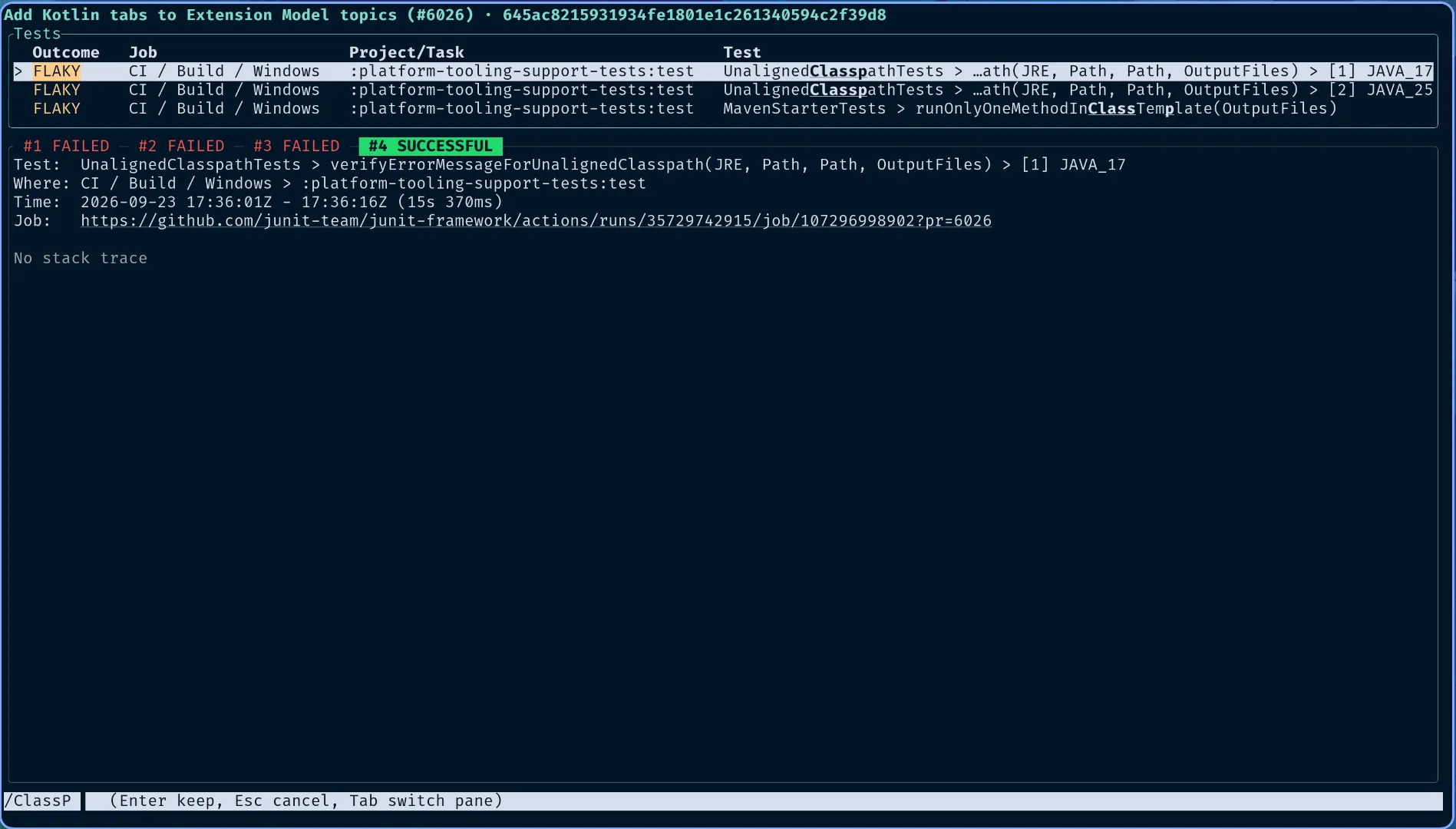
Version 1.1.0 adds a search for the test table: press /, and a search bar
appears in the footer. Typing filters the table with fuzzy matching, matches
are scored so the most relevant ones appear on top, and the matched characters
are shown in bold. When a build fails with a hundred test failures across
several Gradle tasks, / and a few characters of the test name get you to the
row you want.
Vim-like navigation via hjkl
To make Vim users happy, version 1.1.0 supports hjkl navigation everywhere
the TUI accepts arrow keys: j and k move the selection down and up in the
test table, and scroll the details view once you are in it. h and l switch
between test executions. Arrow keys keep working as before, so nobody else has
to learn new keys.
Upgrading
Download the new binary from the
CLI releases page
and replace the old one; the install steps in the
documentation are unchanged. The pr command,
its options, and the plain-text output for scripts and agents did not
change in this release, so nothing you have wired up needs adjusting.
If you don’t use TestLens yet, install the TestLens App and add the setup action to your workflows. Then, analyzing the next red build is only one command away.
Happy testing!