
Analyze Test Failures Quickly With the Test Failure Details View
Have you ever been in this situation? You’re done with the feature, now you just need to push, wait for CI to finish then merge. But then the CI pipeline fails with a test failure and you know you’re up to a round of scrolling through GitHub Actions logs. If you’re lucky, you’ve configured uploading of test reports. But even then you need to navigate to the GitHub Actions summary page, scroll down to the archives sections, download the right archive, unpack it, open the right report file in your browser and finally you’re able to see the cause of the failure.
We’ve been there, done that! But what if it doesn’t have to be that way? What if the assertion that caused the test failure would be visible directly in the pull request? We asked ourselves this question and decided it would be pretty helpful. So we added the test failure details view to TestLens. Let’s look at a real-world example from Spock Framework:
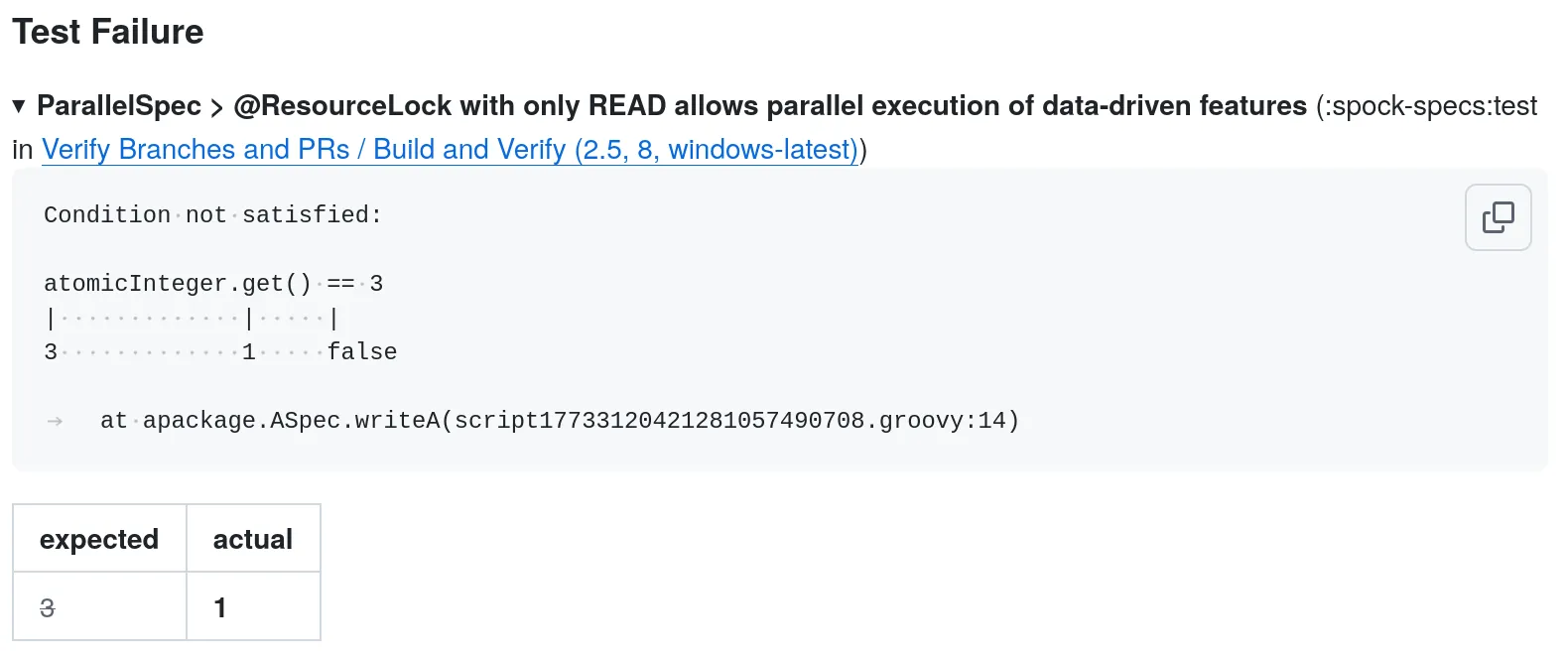
For each test failure during a GitHub Actions run, TestLens now shows the test failures as a expandable sections directly in the pull request. When the section is expanded you can see the the failing assertion, as well as the stacktrace of the assertion failure. Furthermore a table below the stacktrace shows expected and actual values of the failed assertion.
With this at hand, resolving a CI test failure becomes straight forward. All you need is to review the failed assertion, expected and actual values and you have all the information you need in order to make the pipeline green again.
We hope you like this feature. If you want to try it out yourself, please let us know.